
What is ergonomics at work?
The word ergonomics comes from the Greek (ergon = work, nomos = law). It means designing and adapting working conditions and requirements to the needs and abilities of the people who work.
Different work situations can be encountered, so we will first present the general recommendations for office work, especially screen work, and then the good ergonomic practices for workshop and laboratory work.
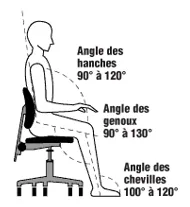
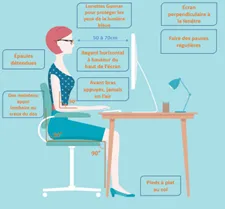
First of all, adjust the height of your seat so that your feet can lie flat on the floor. The recommended angle for the knees is at least 90 degrees.
Avoid pressure points, your seat should not cause pressure points in your legs. Encourage an upright posture when sitting, adjust your armrests so that you can rest your elbows without having to shrug your shoulders.
When sitting upright in your seat, the ideal table height allows you to rest your elbows lightly on the table without having to raise your shoulders.
If you have any questions about ergonomics, please do not hesitate to contact the medical service.
Place the monitor in front of you so that you do not have to turn your head. Adjust the height so that the top edge of the screen is about a palm width below your eyes. The distance between your eyes and the screen should be at least an arm’s length, or slightly more for large monitors. Do not move the screen closer if you cannot read the text well! In this case, increase the font size of the program you are using. You can find more details HERE.
Make sure that your working documents are not positioned between you and the keyboard, but rather between the keyboard and the screen. If possible, the keyboard, documents and screen should be on the same line. Do you want to dive further into the topic? Ergonomics training is available!
And in our workshops and laboratories?
The layout of the workshop should take into account light and noise. Natural light should be preferred, as insufficient or inappropriate light can make it difficult to carry out work. Noise increases fatigue and can induce risk-taking behaviour, so wear your hearing protection! In addition, keep the necessary items (tools, measuring equipment, PPE) close to and easily accessible from your workstation.
Concerning physical effort and in particular the transport of load, the risk increases depending on weight and distance covered. Similarly, the time spent in upright postures also makes ergonomics difficult… to limit the efforts, the lifting devices and the lifting tables must be used!
Training in gestures and postures is also available.
———————–
L’ergonomie au travail, de quoi parle-t-on ?
Le mot ergonomie vient du grec (ergon = travail, nomos = loi). Il désigne le fait de concevoir et adapter les conditions et exigences de travail aux besoins et aux capacités des personnes qui travaillent.
Différentes situations de travail peuvent être rencontrées, nous allons donc d’abord vous présenter les recommandations générales pour le travail dans les bureaux, plus particulièrement le travail sur écran et ensuite, les bonnes pratiques ergonomiques de travail en atelier et laboratoires.
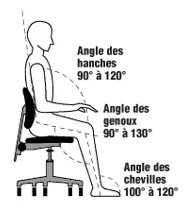
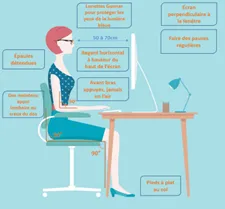
Avant toute chose, réglez la hauteur de votre siège de façon que vos pieds puissent reposer à plat sur le sol. L’angle préconisé pour les genoux est de 90 degrés au minimum.
Evitez les points de compression, votre assise ne doit pas causer de point de pression au niveau de vos jambes. Favorisez une posture droite lorsque vous êtes assis, ajustez vos accoudoirs de façon que vous puissiez poser vos coudes sans avoir à hausser les épaules.
En étant assis droit sur votre siège, la hauteur de table idéale permet de poser légèrement les coudes sur la table sans avoir à soulever les épaules.
Pour toutes questions liées à l’ergonomie, n’hésitez pas à solliciter le service médical.
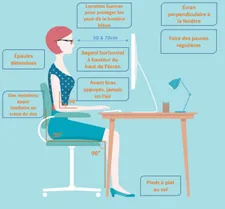
Placez le moniteur devant vous de façon à ne pas devoir tourner la tête. Réglez la hauteur de façon que le bord supérieur de l’écran se trouve environ une largeur de paume en dessous de vos yeux. L’écart entre vos yeux et l’écran doit être au minimum de la longueur d’un bras, ou un peu plus pour les moniteurs de grande taille. Ne rapprochez pas l’écran si vous ne pouvez pas bien lire les textes ! Dans ce cas, augmentez la taille des caractères du programme que vous utilisez. Vous trouverez plus de détail ICI.
Veillez à ce que vos documents de travail ne se trouvent pas entre vous et le clavier, mais entre le clavier et l’écran. Si possible, le clavier, les documents et l’écran doivent se trouver sur une même ligne. Vous désirez allez plus loin ? Une formation à l’ergonomie est disponible !
Et dans nos ateliers et laboratoires ?
L’agencement de l’atelier doit prendre en compte la lumière et le bruit. La lumière naturelle doit être privilégiée, une lumière insuffisante ou inadaptée peut compliquer l’accomplissement du travail. Le bruit, quant à lui, accentue la fatigue et facilite les comportements à risque, aussi, portez vos protections auditives !
De plus, gardez les éléments nécessaires (outils, appareils de mesure, EPI) à proximité et facilement accessibles de votre poste de travail.
En outre, les efforts physiques, en particulier le transport de charge selon le poids et la distance, et des postures pénibles par leur durée (position debout) rendent l’ergonomie difficile… Les équipements de levage et les tables élévatrices doivent être utilisées pour limiter les efforts !
Une formation gestes et postures est également disponible.
Also On At CERN
-

Six rules to avoid cycling accidents
To go further, follow the e-learning course: “Road traffic – Bike Riding“ Pour aller plus loin, suivez le cours e-learning “Circulation routière – Rouler à vélo“ Also On At CERN
-
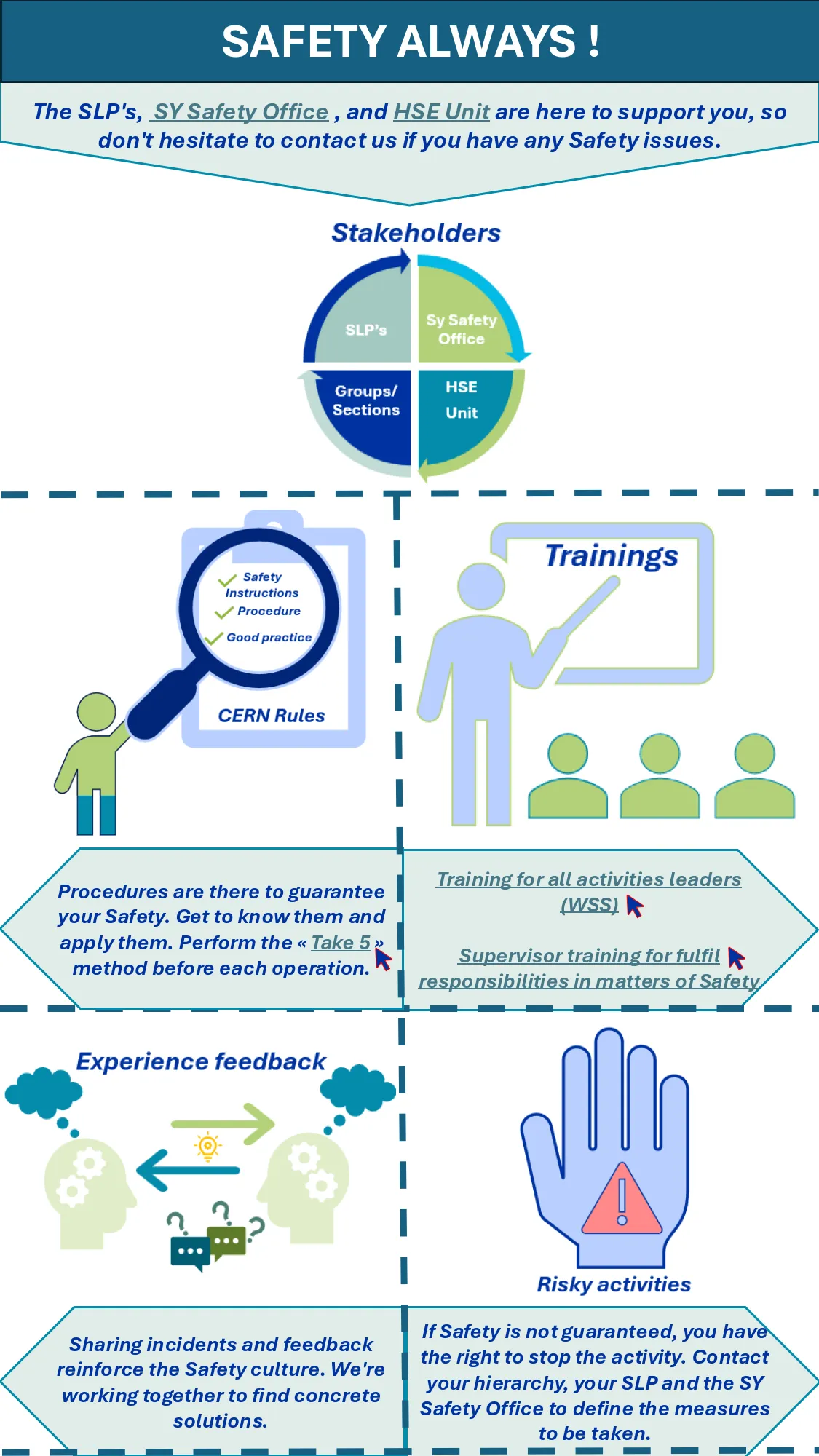
Safety always
Links: SY Safety Office HSE unit Method “Take 5“ Training for all activities leaders (WSS) Supervisor training for fulfil responsibilities in matters of Safety Also On At CERN
-
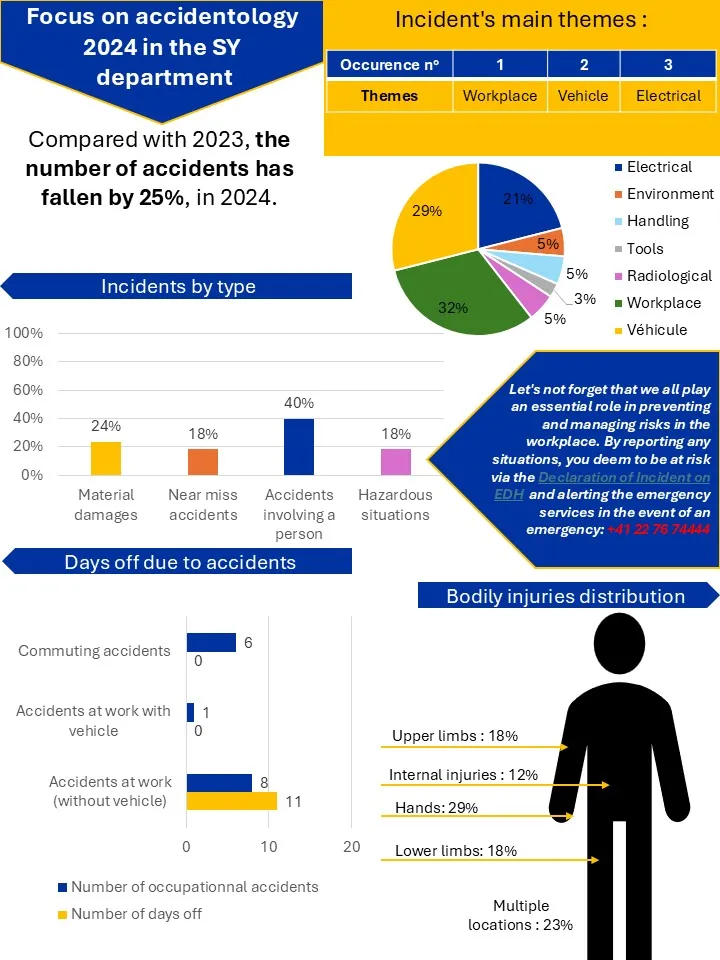
Focus on accidentology 2024 in the SY Department
EDH Incident declaration Also On At CERN
-
Incident declaration
All Safety Incidents occurring on the CERN site or related to CERN activities must be declared. This includes commuting accidents. The responsibilities in matters of safety incident management at CERN are specified in the Safety Regulation SR-SIM available on https://hse.cern/rules. The procedures related to the declaration of Safety Incidents are detailed in the admin e-guide.…
-
In an emergency, every second counts
Become an actor in case of medical emergency! Sign-up on the CERN’s Learning Hub for the “First Aid – Life Saving Actions (LSA) ” training. In this 3-hour course, you will learn who to deal with emergency situations: protect, alert and perform essential first aid actions. The French Federation of Cardiology estimates that each minute…
-

Radiological reminder – Visits nonprofessional and professional ionising radiation areas
For all types of visits on “supervised” areas and professional visits on “supervised” an “controlled” areas, according to General Safety Instruction GSI-SH-1 EDMS 1137263, the escort shall wear his passive dosimeter DIS and activate an Operational dosimeter DMC from the beginning of the visit, with dedicated IMPACT – Professional visit, which has first been validated…
-

What is your security behavior? Evaluate your safety culture
Do you apply the necessary measures for your safety and that of your loved ones (colleagues, family…)? Take this test to assess your safety culture and list your progress! Only one answer per question is possible. Write down your answers and you can determine your profile with the results at the end of the questionnaire!…
-
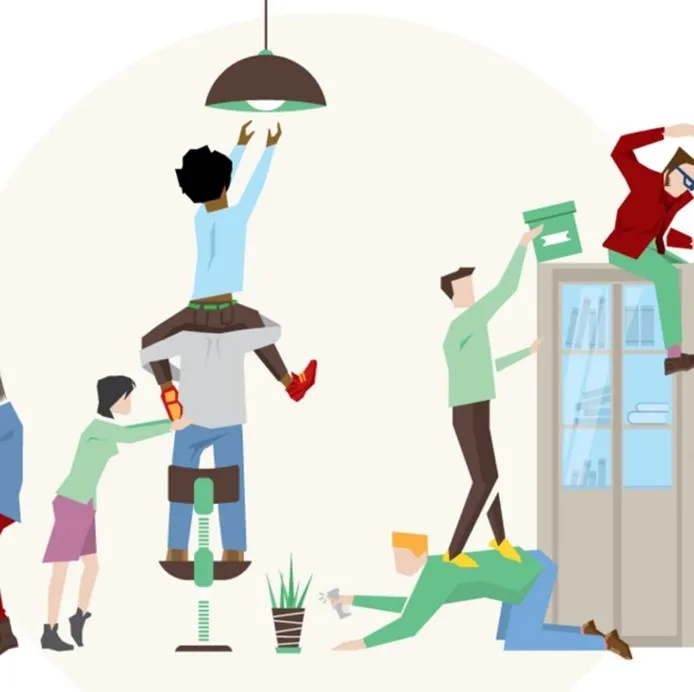
From tidying up the workspace to a healthy, risk-free working environment
Did you know that objects left on the floor are one of the main causes of accidents at home and at work? Although they may appear harmless, objects that are stored incorrectly or on pathways can be the cause of colisions, falls and slips that can have serious consequences for your health. Although these accidents…
-
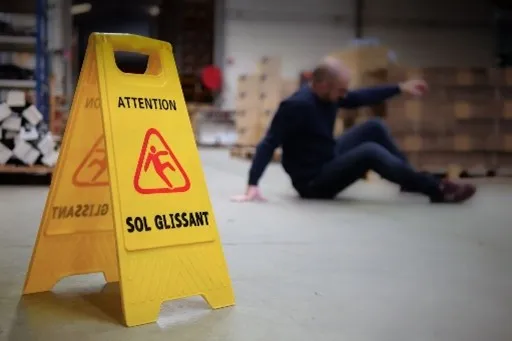
Falls occuring at same level
Saviez-vous qu’au cours de ces deux dernières années, les chutes de plain-pied (glissades, trébuchements, faux-pas et autres pertes d’équilibre sur une surface plane) représentent la 3ème cause principale d’accidents au CERN. Ces chutes surviennent aussi bien à l’intérieur qu’à l’extérieur des locaux. Avec une part de 12% de l’ensemble des accidents répertoriés, cette catégorie d’accidents…
-
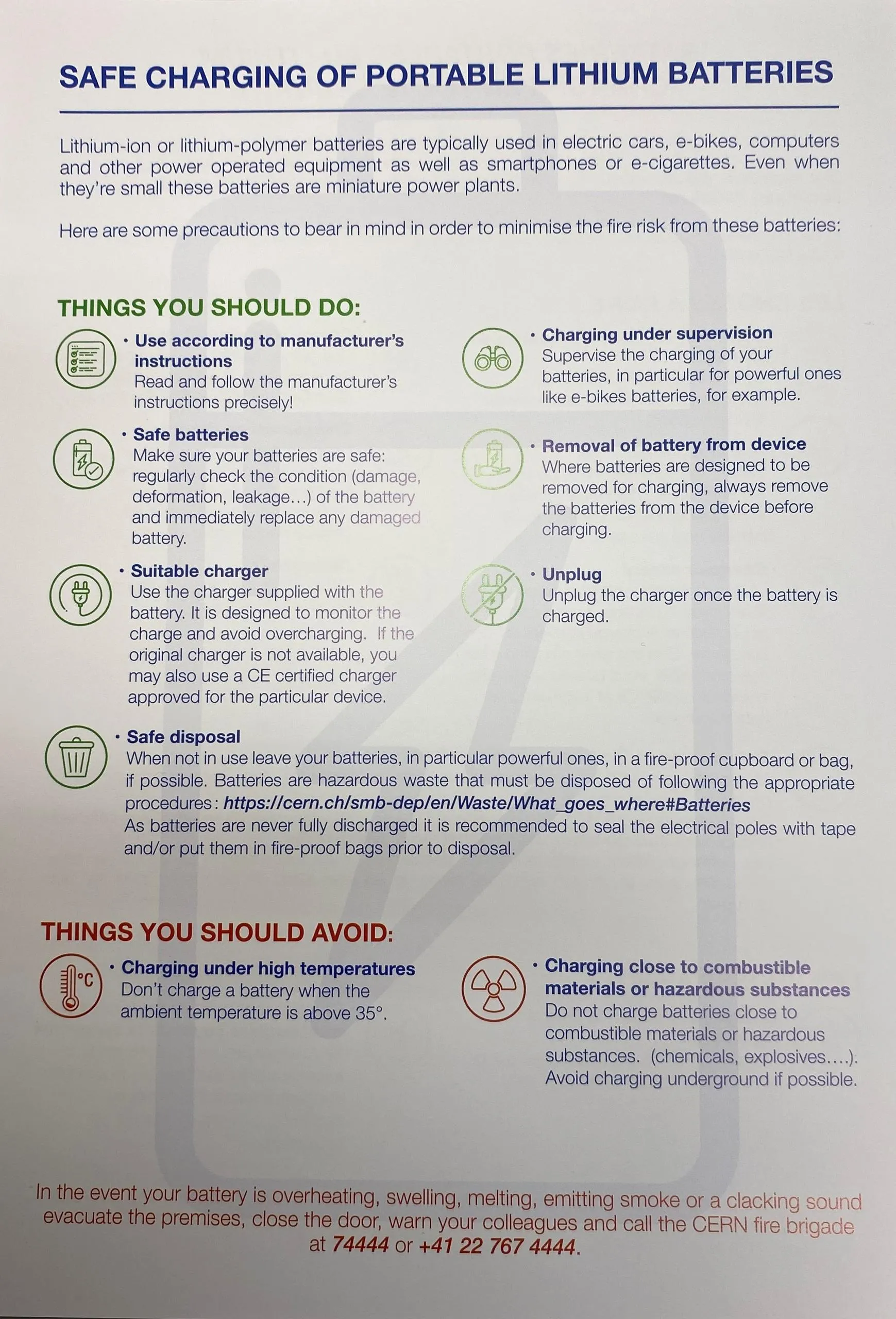
Safe charging of portable lithium batteries
LINK to the CERN bulletin article Also On At CERN